




Table of Contents
- Quick Comparison: Hiring Virtual Assistants for Construction
- How We Evaluated These Virtual Assistant Services
- 1. Hard Hat Helpers: Built for Home Services Contractors
- 2. Virtual Construction Assistants: Industry-Specific Recruitment
- 3. VPM Solutions: Back-Office Support for General Contractors
- 4. Virtustant: Fast Placement for Construction Roles
- 5. Stealth Agents: Managed Staffing for Small Businesses
- 6. Remote Raven: Guidance and Staffing for Builders
- The Bottom Line on Hiring Virtual Assistants for Construction
- Frequently Asked Questions
Last Updated: September 10, 2026
Quick Comparison: Hiring Virtual Assistants for Construction
Hiring virtual assistants for construction is the practice of delegating estimating, dispatching, bookkeeping, and permit paperwork to remote staff trained for trade workflows. It works best when the provider already knows contractor software, not just generic admin.
The stakes are simple: every hour you spend chasing permits or rebuilding a quote is an hour not spent winning work.
| Service | Starting Price | Best For | Standout Feature |
|---|---|---|---|
| Hard Hat Helpers | Contact for pricing | Home services contractors | Trained dispatchers and estimators |
| Virtual Construction Assistants | $250/week | Estimating clerks, PMs | 30-day money-back guarantee |
| VPM Solutions | Contact for pricing | General contractors | Permit and scheduling support |
| Virtustant | $7/hour | Fast role filling | 48-hour candidate shortlist |
| Stealth Agents | $1,200/month | Small business owners | Managed full-time staffing |
| Remote Raven | Contact for pricing | First-time VA hirers | Contractor education resources |

How We Evaluated These Virtual Assistant Services
Most vendor roundups for this category score providers on price and speed alone. That is the wrong scorecard for construction. A virtual assistant who cannot read a division-by-division scope of work, or who mishandles a signed change order, costs more than a trained one within a month. We weighted the criteria below toward the things that determine whether a remote hire survives past day 30.
The five criteria and their weights
1. Trade-specific training and role fit (30%). Does the provider staff people who already understand construction vocabulary, CSI MasterFormat divisions, AIA billing, retainage, lien waivers, submittals, RFIs, punch lists? Or do they hand you a general admin who learns on your dime? We looked for evidence of role-specific vetting, not a generic “we serve many industries” page.
2. Software fluency (20%). Construction back offices run on a specific stack: Procore, Buildertrend, CoConstruct, JobTread, QuickBooks Online with the contractor edition, Sage 100 Contractor, Foundation Software, and, for service trades, ServiceTitan or Housecall Pro. A VA who has never touched your platform needs weeks of ramp-up. We checked whether providers name the platforms their staff are trained on, or whether they leave it to you to train from zero.
3. Pricing transparency and total cost (20%). Hourly rate is not the cost. The real number is rate × hours × ramp-up weeks, plus any placement fee, plus your own management time. We scored providers higher when they publish a rate or a clear range, and lower when the only path to a number is a sales call. We also flagged whether payroll, benefits, and workers’ compensation are handled by the provider or pushed onto you, that distinction can swing the effective cost by 25% or more (bls.gov).
4. Onboarding and time-to-productivity (15%). A new VA should be producing usable output inside two to three weeks. We looked for structured onboarding: a documented role brief, a named account manager, a training plan tied to your tools, and a defined check-in cadence. Providers that drop a candidate into your inbox with no scaffolding scored lower.
5. Data security, access control, and compliance posture (15%). Your VA will touch client PII, bank accounts, permit filings, and contract documents. We looked for written confidentiality agreements, role-based access to your software (not shared logins), device and network standards, and a stated policy on where data is stored and who can see it. Providers that could not describe their security model in writing scored lower, regardless of price.
What we did not weight
We did not weight “24/7 availability” or “dedicated account manager” as standalone selling points. Those are table stakes in this category and every provider on this list claims them. They only matter when paired with trade fluency and a real onboarding process.
How to run this evaluation yourself
If you are comparing providers, run the same five criteria against them and ask for three references in your specific trade, not “construction” broadly, but your trade. A roofer’s dispatch workflow and a commercial GC’s submittal log are different jobs. A reference from a plumber tells you almost nothing about whether a provider can staff a submittal coordinator.
Ask every provider one question before you sign: “Name three platforms your staff are already trained on, and tell me how long onboarding takes for someone who has never used my platform.”
Procore construction management platform
QuickBooks Online for contractors
1. Hard Hat Helpers: Built for Home Services Contractors
Hard Hat Helpers staffs only home services businesses, so its dispatchers and estimators arrive knowing trade workflows rather than learning them on your dime. The company manages onboarding, payroll, and benefits, and assigns a dedicated Client Success Manager to every account. AI tools for contractors.
Key Features
- Virtual staff trained specifically for the home services industry
- Managed payroll, benefits, and onboarding
- 24/7 availability without a full-time salary
- Continuous performance and attendance monitoring
- Tailored training on your products, services, and tools
Pros and Cons
What works: businesses report cutting overhead by more than 50%, and you get pre-qualified talent instead of a résumé pile. Pricing is quoted per engagement, so request a consultation to see if it pencils out for your operation.
2. Virtual Construction Assistants: Industry-Specific Recruitment
This agency recruits construction-only roles, from estimating clerks to project managers, with part-time options starting at 20 hours per week. Rates begin at $250/week, and a 30-day money-back guarantee lowers the risk of a bad match.
Key Features
- Specialized recruitment for construction-specific roles
- Flexible part-time engagement from 20 hours weekly
- 30-day money-back guarantee
- Support for administrative and project management tasks
Pros and Cons
The industry-specific vetting is genuinely useful, and weekly engagement keeps commitments light. Budget for a one-time recruitment fee on top of the weekly rate.

3. VPM Solutions: Back-Office Support for General Contractors
VPM Solutions connects general contractors with assistants who handle permitting, scheduling, and documentation. It suits firms drowning in paperwork more than firms that need estimating help.
Key Features
- Management of permits and scheduling
- Paperwork and documentation support
- simplified hiring for construction businesses
- Focus on operational efficiency
Pros and Cons
Workflows are tailored to general contractor operations, which cuts ramp-up time. Pricing is not listed online, so you must request a quote before comparing costs.
4. Virtustant: Fast Placement for Construction Roles
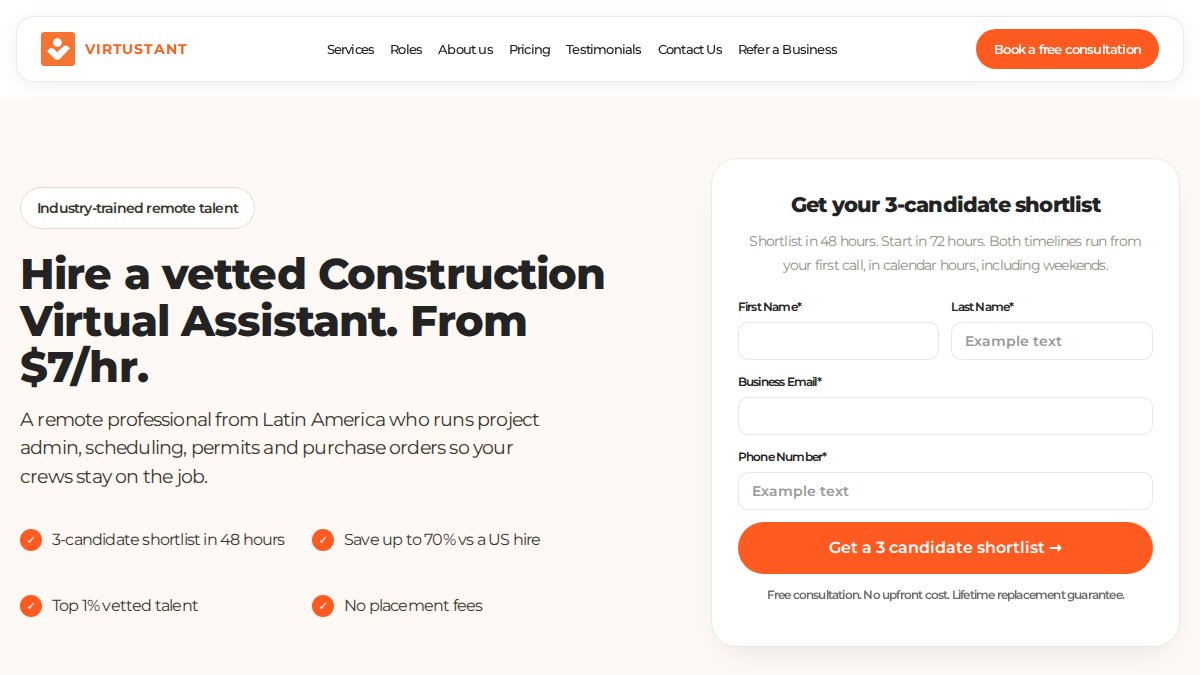
Virtustant promises a three-candidate shortlist within 48 hours and charges no placement fee. At $7/hour, it is the cheapest option here, and the tradeoff is real: lower rates usually mean offshore talent that needs closer supervision.
Key Features
- Three-candidate shortlist within 48 hours
- Vetted talent pool
- No placement fees
- Savings versus local hires
Pros and Cons
Speed and price are the draw, and for a bookkeeping or data-entry role that is often enough. Expect to invest more management time early, especially on client-facing tasks.
5. Stealth Agents: Managed Staffing for Small Businesses
Stealth Agents runs a managed staffing model at $1,200/month for full-time support, with standardized onboarding. It fits owners who want predictable costs and minimal management overhead.
Key Features
- Managed staffing model
- Full-time support options
- Standardized onboarding processes
- Administrative and operational focus
Pros and Cons
Flat monthly pricing makes budgeting straightforward, and the managed layer removes day-to-day supervision. The entry cost is higher than hourly freelance models, so it only pays off at real volume.
6. Remote Raven: Guidance and Staffing for Builders
Remote Raven pairs staffing with education, teaching contractors how to scope a role before they hire. That consultative approach helps first-time buyers avoid a common mistake: hiring without a defined task list.
Key Features
- Educational resources on hiring virtual assistants
- Project management support
- Efficiency-focused staffing strategies
- Consultative remote team building
Pros and Cons
The guidance is the differentiator, and it prevents expensive mismatches. Remote Raven leans toward being a resource hub, so expect to do more of the hiring legwork yourself.
The Bottom Line on Hiring Virtual Assistants for Construction
The right pick depends on your bottleneck. You are moving real work, estimating, dispatch, permit tracking, bookkeeping, inspection documentation, out of your office and into someone else’s hands. That transition has a sequence, and getting the sequence wrong is why most first attempts at remote construction staffing fail.
Match the role to the provider, not the other way around
Different bottlenecks call for different staffing models:
- Estimating and takeoffs. You need someone who can read plans, pull quantities, and build a bid in your estimating software. This is the hardest role to fill remotely and the one where trade-specific vetting matters most. Expect to pay a premium and to spend real time on onboarding.
- Dispatch and scheduling. For service trades, this is a high-volume, software-driven role. It rewards a provider with ServiceTitan or Housecall Pro experience and a documented call-handling script.
- Bookkeeping and job costing. This is the most commoditized role and the easiest to staff cheaply, but only if the VA understands job-cost coding, retainage, and progress billing. A general bookkeeper who has only done retail AP will miscode your costs.
- Permit and compliance paperwork. This role is jurisdiction-specific. A VA in another state can prepare and track filings, but someone on your team still has to verify local requirements. Do not delegate the judgment, only the execution.
- Inspection documentation. If your workflow depends on photo evidence, checklist completion, and timestamped reports, the VA needs to be trained on your specific inspection template and your file-naming convention. This is where most remote setups break down.
The migration checklist nobody gives you
Before your first VA touches a live job, work through this list:
- Document the role in writing. One page: tasks, tools, outputs, decision rights, and what the VA should escalate rather than handle.
- Separate access by role. Create individual logins in your software, never share your own. Scope each login to only the modules that role needs.
- Export your historical data first. Pull your job list, vendor list, chart of accounts, and open estimates into a clean file before the VA starts. This gives you a baseline to check their work against.
- Set a naming and filing convention. Agree on how files, jobs, and photos are named before anything gets uploaded. Retrofitting a convention across thousands of files is painful.
- Run a two-week parallel period. The VA does the work; you or a senior staffer reviews it. Only after two clean weeks do you hand over the live queue.
- Write down your escalation rules. What does the VA do when a client asks for a change order mid-job? When a permit is rejected? When a sub no-shows? Undefined escalation is the number-one source of remote staffing failures in the trades.
What it actually costs
The number that matters is not the rate, it is the fully loaded cost per productive hour. Add the rate, any placement fee, your ramp-up time, and the management hours you will spend in the first month. A virtual assistant who needs 40 hours of your supervision in month one is not cheaper than a virtual assistant who needs five.
Do not hand a remote VA your bank credentials, your e-signature, or your state contractor license number. Those stay with you or a bonded, insured principal. A VA can prepare a permit application; a licensed qualifier signs it.
The compliance layer most guides skip
Construction is a licensed, regulated trade. Whoever you hire remotely, the license, the bond, the insurance, and the legal signature stay with your firm. A VA can gather documents, prepare filings, and track deadlines, but the licensed qualifier on your license is the one accountable to the state licensing board. Build that division of labor into the role brief from day one, and keep a written record of who prepared and who approved each filing.
The short version
If estimating and dispatch are eating your week, choose a provider with trade-trained staff and a real onboarding process. If you need a cheap bookkeeper fast, a low-cost offshore placement can work, provided you have clean job-costing procedures and someone to review the output. Match the service to the role, document the role before you hire, and keep the licensed and financial decisions in-house. Do those three things and remote staffing pays off. Skip them and you will spend more time managing the VA than you saved.
Start with one role and a two-week parallel run. Expand only after the first role is producing clean output without daily intervention.
Frequently Asked Questions
What tasks can a virtual assistant handle for a construction company?
Virtual assistants in construction typically manage dispatching and scheduling, customer follow-ups, invoicing, permit paperwork, vendor coordination, and CRM updates. Many also handle estimating support, document control, and collections. The right fit depends on your biggest bottleneck; most contractors start with dispatching or administrative tasks to free up field time.
How much does it cost to hire a virtual assistant for construction?
Pricing varies by provider and role. Always ask for a quote based on your specific scope, hours, and software needs.
Are virtual assistants for construction trained in industry-specific software?
Many specialized services train assistants on platforms like ServiceTitan, Jobber, and Buildertrend, as well as estimating tools. For example, Hard Hat Helpers provides tailored training on your specific products, services, and software. During onboarding, confirm that training covers your exact tools and workflows to avoid productivity gaps.
How do I integrate a virtual assistant into my existing construction team?
Start with a defined role and clear daily tasks, such as dispatching or invoice processing. Assign a point person on your team to answer questions and review work during the first two weeks. Use shared calendars, project management software, and regular check-ins. Most assistants become fully productive within 30 days if expectations and workflows are documented.
What should I look for when hiring a virtual assistant for home services?
Prioritize industry experience, software proficiency, and a structured onboarding process. Look for services that offer performance monitoring, a dedicated account manager, and a replacement guarantee. Ask about data security, communication protocols, and how they handle time zone differences. References from similar-sized HVAC, plumbing, or remodeling businesses are a strong signal.
The hardest part of hiring virtual assistants for construction is trusting someone else with your clients and your numbers. Hard Hat Helpers removes that risk by supplying pre-qualified dispatchers, estimators, and office managers trained on your products and tools, with managed payroll and a dedicated Client Success Manager on every account. Book a consultation with Hard Hat Helpers and get administrative work off your plate.

