



Table of Contents
- 1. Standardize Your Emergency Intake and Triage Protocols
- 2. Deploy Skill-Based Technician Routing and Real-Time Assignment
- 3. How to Handle Emergency Service Requests With Speed and Clarity
- 4. Implement Field Service Dispatch Software Features That Matter
- 5. Monitor Emergency Service Response Time Metrics and Adjust
- 6. Build a Dispatcher Training and On-Call Coverage Model
- 7. Prevent Dispatcher Burnout and Support Mental Health
- Conclusion
Last Updated: August 11, 2026
1. Standardize Your Emergency Intake and Triage Protocols
When an emergency call arrives, the first 30 seconds determine everything. A standardized intake workflow removes guesswork from the dispatcher’s role, ensuring every call follows the same structured path and preventing costly mistakes like missed critical information or misrouted calls.
Creating a Consistent Intake Workflow
Your intake workflow should capture four non-negotiable data points: caller identity and location, nature of the emergency, hazards or special conditions, and customer contact method. Write this into a script your dispatchers follow verbatim on every call. Build your intake form in your dispatch software with required fields that won’t let the dispatcher move forward until they’re completed. This forces compliance without nagging and ensures that a customer with a gas leak receives the same triage questions as a customer with a burst pipe.
Building a Triage Decision Tree
Not all emergencies are equal. Your triage decision tree separates genuine life-safety emergencies from urgent-but-not-critical calls, which changes routing and response expectation.
Create a simple decision tree: Does this call involve immediate danger to life or property? If yes, it’s Priority 1, dispatch immediately. If no, ask: Is the customer without essential service (heat in winter, water supply, electrical power)? If yes, Priority 2, dispatch within 2 hours. If no, it’s Priority 3, standard scheduling applies. Document this tree visually where dispatchers can see it during calls.
Train dispatchers to confirm the triage level with the caller before hanging up. Say: “Based on what you’ve told me, this is a Priority 1 emergency, we’re sending someone immediately.” Confirming sets expectations and prevents arguments later.
2. Deploy Skill-Based Technician Routing and Real-Time Assignment
Skill-based routing means matching the job to someone who can actually handle it, not just whoever is closest or available first. This cuts callback rates and reduces first-time fix failures. Your dispatch software should store technician certifications, experience areas, and equipment capabilities. When a call comes in, the system filters available technicians by required skills, then sorts by proximity or current workload.

Matching Skills to Urgency
In a Priority 1 call, send the first available qualified technician, even if someone with slightly more specialized experience is 10 minutes away. Speed wins over perfection in emergencies. For Priority 2 and 3 calls, you have room to be more selective. Wait a few minutes for a better match if it improves outcome probability, but set a timer, if the ideal technician isn’t available within 5 minutes, move to the next qualified option.
Reducing Dispatch Time Through Automation
Field service dispatch software with automated assignment rules can route calls instantly based on your criteria: skill match, availability, location proximity, current workload. The dispatcher reviews the auto-assignment and confirms it. If the system made a mistake, the dispatcher overrides it. Most of the time, automation is faster and more consistent than human judgment.
Automation can create bottlenecks if your qualified technician pool is too small. Before automating, audit your technician skills and cross-train where gaps exist.
3. How to Handle Emergency Service Requests With Speed and Clarity
The caller is stressed. Your dispatcher is their first human contact. How you handle the next 60 seconds determines whether the customer feels confident or terrified. Speed matters, but clarity matters more.
Pre-Call Preparation and Caller Scripts
Before the first call of the day, your dispatchers should know your company’s emergency response commitments. Write a dispatcher script for emergency calls covering: greeting and company name, immediate question about safety, location confirmation, problem description, and callback number. The script should take 60-90 seconds to deliver. Train dispatchers to listen more than they talk. After asking a question, stop and let the caller answer fully.
Confirming Details Without Delaying Response
Collect the minimum information needed to triage and assign: location, nature of emergency, immediate hazards, and callback number. Don’t ask for email address or preferred appointment window. If the caller provides extra information, listen and note it, but don’t ask follow-up questions that don’t change your response. Confirm the details back to the caller before ending the call to prevent misroutes.
4. Implement Field Service Dispatch Software Features That Matter
Not all field service dispatch software is built for emergency calls. Emergency dispatch needs different capabilities: real-time location tracking, instant assignment, mobile-first interface, and integration with your existing tools.
Essential Mobile and Real-Time Capabilities
Your technicians need to see incoming assignments instantly and confirm receipt within seconds. Your dispatch software must have a mobile app that works offline and syncs instantly when reconnected. Real-time location tracking is non-negotiable, you should see where every technician is on a live map, updated every 30 seconds. This lets you assign the closest available person and give customers accurate arrival windows.
The mobile app should let technicians accept or decline assignments with one tap. Accept takes 2 seconds. Decline with a reason takes 5 seconds. Your dispatcher immediately sees the decline and sends the job to the next qualified technician.
Integration With Your Existing Tools
Your dispatch software needs to talk to your CRM, accounting system, customer communication tools, and technician scheduling system. Look for software with open APIs or pre-built integrations. The best integration for emergency dispatch is with your phone system, when a call comes in, the caller’s information should automatically pop into the dispatch system, saving 30 seconds per call and eliminating typos.
5. Monitor Emergency Service Response Time Metrics and Adjust
You can’t improve what you don’t measure. Response time is the interval between when a call ends and when a technician is en route. First-time fix rate is the percentage of emergency calls that don’t require a callback or second visit. Both metrics reveal whether your dispatch process is working.
Tracking the Right KPIs
Track average response time by priority level, percentage of calls meeting your response time target, first-time fix rate, and technician use during emergencies. For Priority 1 calls, track whether you’re hitting your commitment (typically 30-60 minutes). First-time fix rate tells you whether your skill-based routing is working. If callbacks are high, technicians are arriving unprepared or under-skilled. Aim for 70-80% technician use so you have buffer capacity for surges.
Using Data to Identify Bottlenecks
Pull your dispatch data weekly and ask: where are we slowing down? Is the bottleneck in intake, assignment, or travel time? If intake is slow, simplify your script. If assignment is slow, your automated routing isn’t working or you don’t have enough qualified technicians. If travel time is the problem, you might need to add technicians to underserved zones.
The best emergency field service dispatch systems treat metrics as feedback loops. Measure weekly, identify the slowest step, fix it, measure again. Small improvements compound, cutting 5 minutes off response time across 100 monthly calls saves 8+ hours of technician travel per month.
6. Build a Dispatcher Training and On-Call Coverage Model
Your dispatcher is the most important person in your emergency operation. They make split-second decisions under stress. Yet most home service companies train dispatchers on the job with no formal structure. Emergency dispatch is a skill that requires deliberate practice and feedback.
Training Dispatchers for High-Pressure Environments
Start with a structured onboarding program. New dispatchers should shadow experienced ones for at least one week before taking calls alone. After shadowing, new dispatchers should handle calls with an experienced dispatcher listening in. After 20-30 calls with oversight, they can handle calls independently.
Ongoing training should happen monthly. Review recorded calls and discuss what went well and what could improve. Include training on recognizing burnout, de-escalation techniques, and when to ask for a break during a shift. Dispatchers who are burned out make worse decisions.
Structuring On-Call Shifts and Backup Coverage
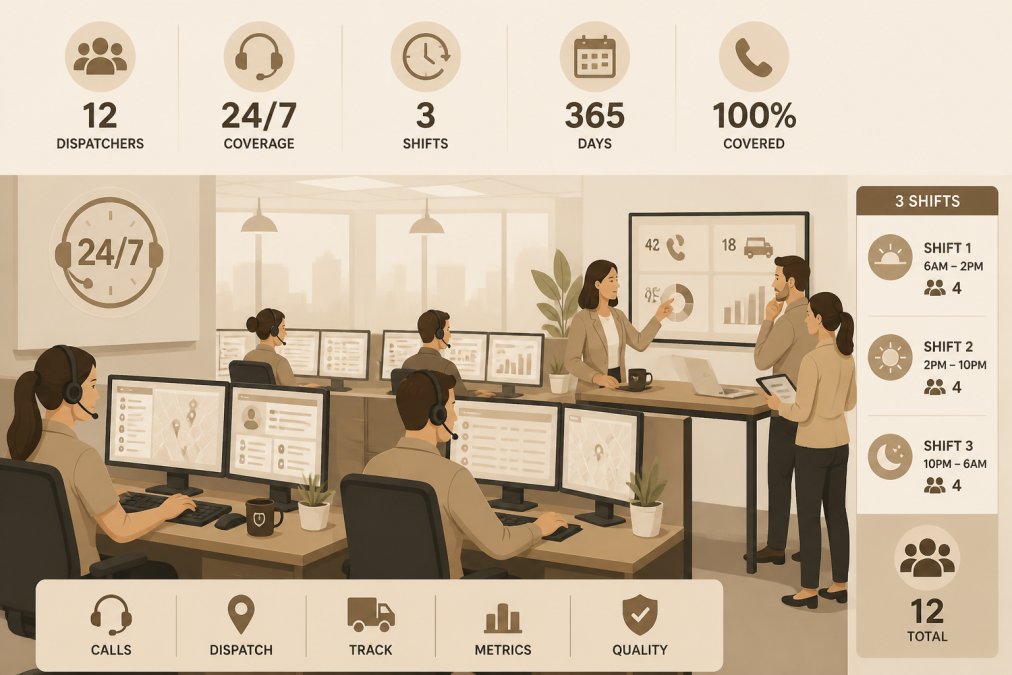
Emergency calls don’t stop at 5 p.m. If you have a small team, you’ll need an on-call rotation where dispatchers take turns being available outside normal hours. Compensate on-call time fairly. If you have a larger team (4+), shift to a true overnight shift with dedicated night staff. This is better for dispatcher health because it’s a regular schedule, not constant rotation.
Backup coverage is critical. At least two dispatchers should be trained on every shift. Consider using virtual staffing for overflow or backup coverage. Hard Hat Helpers provides pre-trained dispatchers specifically for the home services industry who can integrate into your operation with minimal onboarding.
7. Prevent Dispatcher Burnout and Support Mental Health
Dispatcher burnout is real and it’s expensive. A burned-out dispatcher makes slower decisions, misses details, and eventually quits. Replacing a dispatcher costs time and money. Preventing burnout is cheaper than managing turnover.
Dispatchers handle emotionally intense calls all day. Create a culture where dispatchers can voice stress without judgment. If a dispatcher had a particularly difficult call, give them 10 minutes to decompress before the next one. Ensure adequate staffing so dispatchers have time to reset between calls.
Post-emergency debriefing is valuable. After a particularly stressful call, take 15 minutes as a team to talk through what happened. What went well? What was hard? What could we do differently next time? This converts a stressful experience into learning and builds team cohesion.
Ignoring dispatcher mental health will eventually force you to rebuild your entire dispatch operation when your experienced staff burns out. The cost of that disruption far exceeds the cost of investing in dispatcher wellness now.
Emergency field service dispatch is fundamentally about people and process working together under pressure. Technology helps, but your dispatchers, technicians, and protocols are what make emergency response work.
If your current operation is reactive, start with standardized intake and triage. That single change will improve response time and reduce errors. Once intake is solid, add skill-based routing. Once routing is working, measure and optimize.
The best emergency field service dispatch systems are built incrementally. Each improvement compounds. Within 6 months of focused effort, you’ll have response times you can count on, technicians who know what to expect, and customers who feel confident when they call.
For operations struggling to find experienced dispatch talent or needing flexible coverage for nights and weekends, Hard Hat Helpers provides pre-trained dispatchers specifically for home services companies. Your dispatcher arrives already trained on industry terminology, triage protocols, and field service operations, no ramp-up time. With dedicated support and continuous performance monitoring, you get reliable dispatch coverage without the overhead of full-time hiring. Book a consultation to see how this fits your operation.
Frequently Asked Questions
What is the role of a field service dispatcher in emergency response?
A dispatcher is the command center operator who receives emergency calls, assesses urgency through triage protocols, matches the right technician to the job based on skills and location, and coordinates real-time communication between the office and field team. In emergency field service dispatch, dispatchers reduce response time by making rapid, accurate routing decisions and keeping all parties informed. Their performance directly impacts customer safety and your service level agreements.
How do you prioritize emergency service calls?
Prioritization uses a triage protocol that ranks calls by severity, safety risk, and customer impact. Life-safety issues (gas leaks, electrical hazards, flooding) go first. Next come service failures affecting multiple customers or critical systems. Lower-priority calls handle non-urgent requests. Dispatchers use a decision tree to classify each call in seconds, then assign the highest-priority jobs to available technicians immediately. This prevents delays and ensures resources go where they matter most.
What field service dispatch software features are essential for emergency response?
Critical features include real-time technician location tracking, mobile work order assignment, two-way communication (SMS or in-app messaging), automatic job routing based on technician skills and availability, and offline capabilities so field staff can work without connectivity interruptions. Integration with your CRM ensures dispatchers have complete customer history. GPS-enabled routing cuts travel time, and automated alerts notify customers of arrival windows, reducing callback rates and improving first-time fix rates.
How can I improve emergency service response times?
Start by tracking mean time to respond (MTTR) and mean time to fix (MTTR). Standardize your intake process so calls are classified in under 60 seconds. Use skill-based routing to match technicians to jobs instantly rather than manually searching. Implement dispatch automation so assignments reach field staff within seconds of job creation. Train dispatchers on your service areas and technician capabilities so they make confident decisions fast. Monitor real-time metrics daily and adjust coverage if bottlenecks appear.
What common challenges affect emergency field service dispatch operations?
Dispatcher burnout from high-pressure environments, inconsistent triage decisions leading to slow response, technician unavailability due to poor on-call scheduling, communication gaps between office and field, and lack of real-time visibility into technician location and status. Many teams also struggle with manual scheduling that wastes 30+ minutes per shift. Addressing these requires standardized protocols, software automation, dispatcher training, and mental health support structures to keep teams sustainable long-term.

